



Changelog
Updates, changes, and improvements in Fynd Boltic
Introducing “Run with Previous” - Smarter Workflow Replays in Boltic
New feature
We’re excited to launch Run with Previous, a powerful new feature designed to make debugging, testing, and recovery faster and more efficient across your workflows.
What’s New
1. Run with Previous
Re-run individual workflow nodes using previously executed data - no need to start from scratch.
2. Reuse Historical Inputs & Outputs
Access data from past executions and re-run nodes with the same context
3. Faster Testing & Iteration
Validate changes instantly without executing the entire workflow
4. Streamlined Troubleshooting
Pinpoint and fix issues by re-running only the affected nodes
5. Recover from Partial Failures
Resume workflows efficiently without repeating successful steps

Why It Matters
- Save time by avoiding full workflow re-runs
- Debug and test with precision
- Improve developer productivity and workflow reliability
- Reduce unnecessary compute usage
Start using Run with Previous today and take full control of your workflow executions.
Boltic Serverless - CLI, Workspaces & Runtime Controls - Now Live!
New feature
We’re excited to introduce new enhancements and features to Boltic Serverless, focused on improving developer workflows, control, and deployment flexibility.
1. What’s New - Boltic CLI for Serverless
A new CLI experience is now available for managing serverless directly from your terminal.
Create and manage serverless functions locally
- Simple command: boltic serverless create
- Supports multiple runtimes (e.g., Node.js)
- Blueprint-based function creation
- Local changes sync with Boltic platform
Prerequisites
- Node.js must be installed
- NPM must be available on your local machine
How It Works
- Run boltic serverless create
- Choose type (code/container), name, and language
- CLI generates blueprint and starts build
- Track build and deployment status in real time
- Manage configs locally via boltic.yaml
Link - https://docs.boltic.io/cli/commands/serverless/
2. Workspaces
Introducing Serverless Workspaces for a more integrated development experience.
- Create dedicated workspaces for serverless apps
- Add multiple apps from repositories
- Run functions in a VS Code browser environment
- Choose machine types (including auto-suspend)
How It Works
- Create a workspace and link your repository
- Select compute configuration
- Develop and run functions directly in browser-based VS Code
- Manage multiple serverless apps in one place
3. Start / Stop Controls
You now have full control over serverless runtime states.
- Start or stop serverless functions anytime
- Easily pause running workloads
- Restart services when needed
How It Works
- Use the start/stop option from the dashboard
- Stop pauses execution and frees resources
- Start resumes the serverless function
- Status updates visible during build and runtime

4. Auth-Based Docker Image Pull
Securely pull container images from private registries.
- Authenticate using Docker username and token
- Pull images directly from your Docker account
- Works seamlessly with container-based deployments
How It Works
- Select container-based serverless option
- Provide Docker credentials
- Boltic securely pulls and deploys your image
Why This Matters
- Build and deploy faster with a CLI-first workflow
- Develop seamlessly with workspaces + browser VS Code
- Gain better control with start/stop runtime management
- Use private images securely with auth-based Docker pulls

Try out the CLI, Workspaces, and new runtime controls on Boltic Serverless today
Boltic Launches Granola AI Integration for Automated Meeting Insights & Workflows
New feature
We’re excited to introduce Granola AI integration on Boltic - bringing AI-powered meeting intelligence directly into your workflows.
Automate how you capture, process, and act on meeting insights without manual effort.
What’s New - Granola AI Integration
You can now connect Granola AI, an AI meeting assistant that records, transcribes, and summarizes meetings.
- Automatically capture meeting notes and summaries
- Access structured insights and action items
- Integrate meeting data into workflows
- Extend functionality with custom API requests
How It Works
- Connect your Granola account within Boltic workflows
- Use Notes APIs to:
- List meeting notes with filters (created/updated)
- Retrieve specific notes using note ID
- Use Custom API Requests to:
- Call any Granola endpoint
- Pass custom query params and payloads
- Process outputs inside workflows for further automation
Key Capabilities
- List Notes - Fetch meeting notes with filtering options
- Get Note by ID - Retrieve detailed meeting insights
- Custom Requests - Flexible API calls for advanced use cases
Why This Matters
- Eliminate manual note-taking with AI-generated summaries
- Turn meetings into actionable workflows
- Automatically sync meeting insights across systems
- Build smarter automations using real conversation data
Start using Granola AI with Boltic Workflows and make your meetings actionable
Boltic Table AI - Manage Boltic Tables with AI
New feature
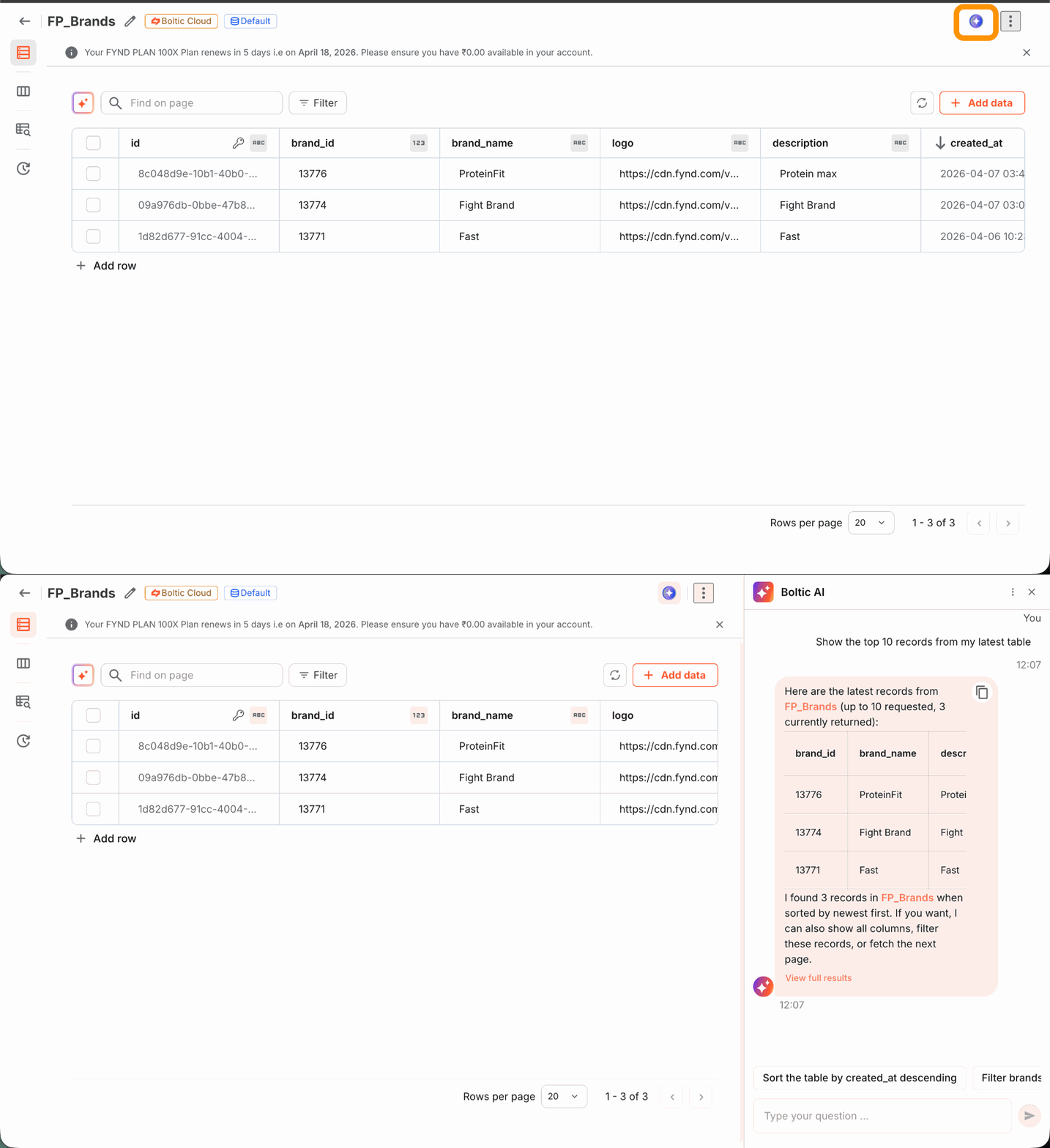
Boltic Table AI is now live - an intelligent assistant that lets you create, query, and manage your entire Boltic Tables setup using plain English. No SQL, APIs, or manual setup required. Powered by LangGraph ReAct and OpenAI GPT-5.4, it understands intent and executes actions instantly.
What's New
- Boltic Table AI (LangGraph ReAct) – A fully conversational AI agent connected directly to your Boltic Tables
- Natural Language Operations – Describe what you want, and the agent figures out the how
- Streaming Responses – Get real-time feedback as the agent works through your request
- Context-Aware Conversations – Session-based chat history means the agent remembers what you've discussed
- Smart Intent Dispatcher – LLM-powered routing automatically directs your request to the right agent - Database or Workflow
What Boltic Table AI Can Do
Area Supported Operations
- Databases - List, Create, Get, Update, Delete
- Tables - List, Get, Create, Update, Delete
- Records - List, Get, Create, Update, Delete
- Fields - List, Get, Create, Update, Delete
- Indexes - Get Index Types, List, Create, Delete
- Web - Fetch and read content directly from URLs
How It Works
Open the Boltic Table AI from your Boltic dashboard
- Type your request - "Create a new table for customer orders" or "List all records where status is pending"
- The Intent Dispatcher routes your message to the right agent automatically
- Boltic Table AI interprets your intent and executes the operation using Boltic Tables API
- Get a real-time streaming response as actions are completed
- Continue the conversation - the agent retains full context throughout your session
Why It Matters
- Manage complex database operations without writing a single line of SQL or code
- Execute CRUD and schema operations in seconds through natural conversation
- GPT-5.4 powered intelligence understands nuanced, multi-step requests accurately
- Smart routing ensures the right agent always handles the right task
- Session history stored in PostgreSQL with optional Redis caching for speed
- Fully integrated within Boltic's governed, reliable infrastructure
- Drastically reduce time spent on database management and schema operations
Intent Dispatcher - Smarter Routing, Every Time
- The built-in Intent Dispatcher uses LLM-based routing to understand the nature of your request and send it to the right place:
- Mentions of tables, databases, records, fields, schema, CRUD → Boltic Table AI
- No manual switching. No confusion. Just seamless, intelligent routing.
Boltic Table AI transforms how your team interacts with data - making powerful database operations as simple as sending a message.
Boltic Workflow - Real Data Visibility in Execution Logs
Enchancement
Overview:
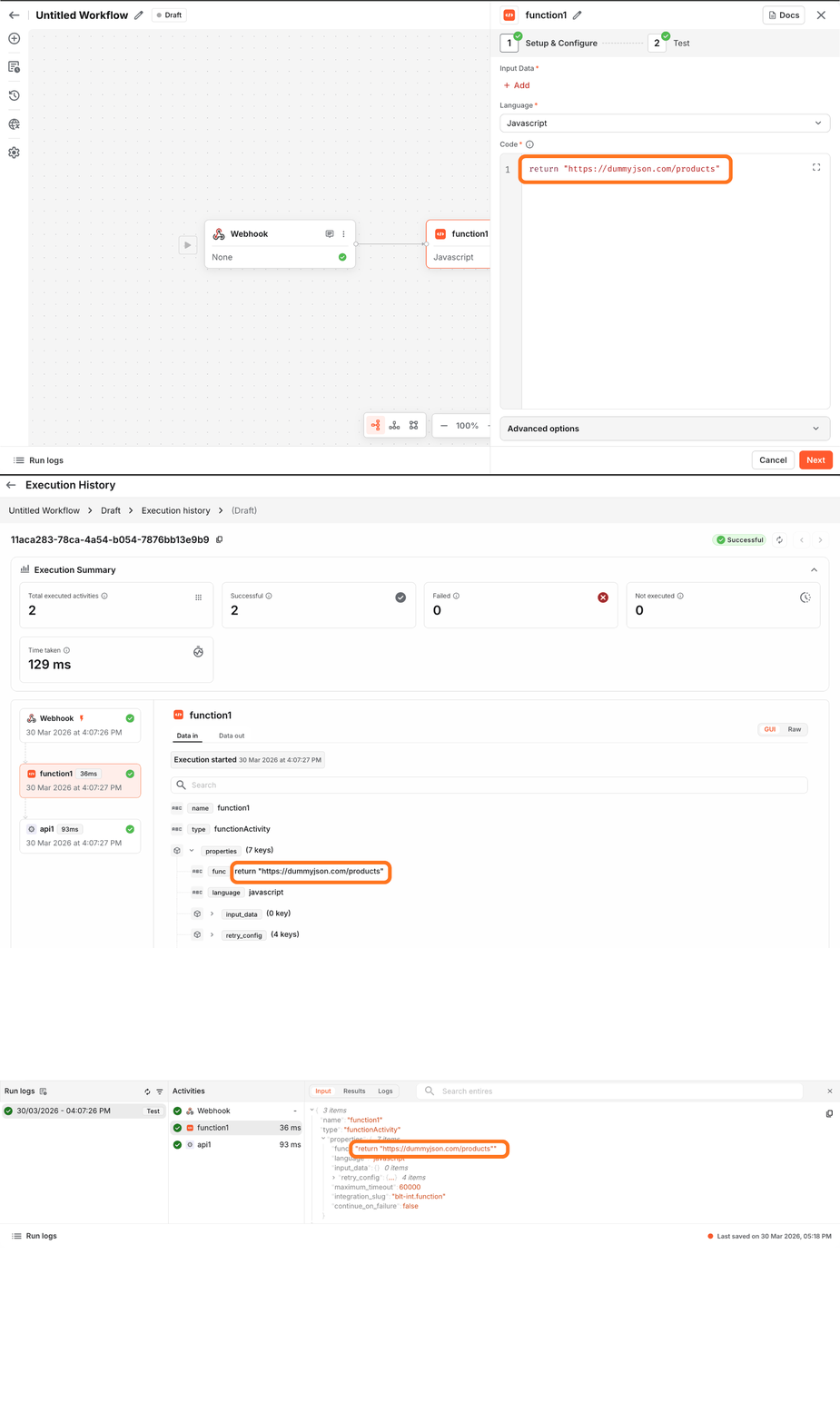
- Previously, input logs in Execution History and Run Logs displayed unresolved placeholders (e.g. {{variable}}), limiting visibility into the actual payload sent during workflow execution. This made debugging dependent on assumptions or external validation.
- With this release, input values are now resolved and surfaced at runtime.
What’s Changed:
- Input logs now display resolved runtime values instead of raw {{}} placeholders
- Dynamic variables are evaluated during execution and persisted in logs
- Logs reflect the exact payload sent to Temporal for each workflow run
Why This Matters:
- Deterministic Debugging - Inspect actual runtime inputs without reconstructing variable states
- End-to-End Observability - Trace input data across execution stages with full fidelity
- Faster Root Cause Analysis - Identify null, malformed, or unexpected values instantly
- Improved Execution Confidence - Validate data integrity across workflow runs
Impact:
- Eliminates ambiguity in input inspection
- Reduces reliance on external debugging and log correlation
- Accelerates issue resolution and improves workflow reliability
Applicability:
Applies to all workflows leveraging dynamic variables in Execution and Run Logs
New Integration: Salla - Triggers & Activities Now Live
New feature
We’re thrilled to announce that Boltic now officially supports Salla - one of the most powerful and widely adopted e-commerce platforms in the Middle East. You can now connect your Salla store directly within Boltic and build powerful, real-time automations - no custom setup required.
What's New:
• Salla as a Trigger – Automatically start workflows when key store events occur
• Salla as an Activity – Perform actions on your store within workflows
• Wide event coverage – Orders, customers, inventory, products, and more
How It Works:
1. Connect your Salla store from the Integrations panel
2. Choose Salla as a Trigger to start workflows (e.g., new order, customer update)
2a. Or use Salla as an Activity to push data or take action mid-workflow
2b. Combine Salla with other integrations to build end-to-end automations
Why It Matters:
• Native support for Salla’s full commerce event ecosystem
• Automate repetitive store operations - no code needed
• Seamlessly connect with CRMs, ERPs, and notification tools
• Scale workflows with reliability and governance built in
• Tailored for Middle Eastern commerce use cases
Boltic’s Salla integration brings your store data to life:
Automate faster, respond instantly, and scale your commerce workflows with ease.
Boltic Launches Discord Integration for Real-Time Server Automation
New feature
We’re excited to announce that Discord Integration is now live in Boltic, enabling real-time server automation using powerful triggers and actions!
Now you can automate moderation, manage roles, respond to mentions, and control channels - all directly inside your workflows.
Triggers
- New User Added – Trigger when a new member joins the server.
- New Message Posted on Channel – Trigger when a message is sent in a specific channel.
- New Forum Message – Trigger when a new message is added inside a forum post.
- New Forum Post – Trigger when a new post is created in a forum channel.
- New Mention – Triggers when a user or role is mentioned.
Discord Activities (Actions)
User
- Get Current User Servers
- Get Current User's Server Details
- Get User by ID
- Search Server Users
Channel
- Rename Channel
- Delete Channel
- Search Channel by Name
Message
- Send Channel Message
- Get Channel Messages
- Get Channel Message by ID
- Delete Channel Message by ID
Role
- Create Role
- Delete Role
- Add Role to User
- Remove Role from User
Forum
- Create New Forum Post
- Send Message in Forum Post
Use Case: Create an intelligent Boltic bot that replies instantly when mentioned.
How It Works in a Workflow:
New Bot Mention in Discord (Trigger) → Fetch Bot ID → If/Else check (mentioned user is Boltic Bot) → Send prompt to OpenAI → Generate response → Send Channel Message in Discord → Automation Complete
Benefits of Discord Automation
- Eliminate manual moderation tasks
- Instantly respond to mentions
- Automatically manage roles & permissions
- Build self-managing communities
- Connect Discord with your entire automation ecosystem
Boltic Workflow - Activate only one Version at a time
Enhancement
We've updated how workflow versions are managed in Boltic.
What's changed:
- When you publish a new version of a workflow, all previous versions will automatically be marked as Inactive
- Only 1 version of the respective workflow will be UP and RUNNING
Why This Matters:
- No conflicts - Eliminates the risk of multiple versions running simultaneously and causing unexpected behavior
- Predictable execution - Always know exactly which version of your workflow is live
- Easier debugging - Troubleshoot with confidence knowing only one version is active at a time
- Cleaner version control - Keeps your workflow history organised and easy to track
- Faster rollouts - Publishing a new version instantly takes over without any manual deactivation steps
- Cost effective - Boltic's metering system bills only for active usage - no charges for idle or redundant versions
Impact:
Clients get a more stable, conflict-free workflow experience with tighter cost control - only the version that matters stays active.
Applicability:
These changes apply to all workflows created after 1st Jan 2026. All older workflows will have older versions running too.

New Integration: Google Tasks - Activity Support Now Live
New feature
Boltic now supports Google Tasks, letting you connect your account and seamlessly create, update, and manage tasks within your workflows - no custom setup required.
What's New:
- Google Tasks as an Activity – Perform actions on your Google Tasks account mid-workflow
- Full task management support – Create tasks, update task details, mark completions, and manage task lists programmatically
- Seamless workflow integration – Use Google Tasks alongside any trigger to assign and track work at the right moment
How It Works:
- Connect your Google Tasks account from the Integrations panel
- Add Google Tasks as an Activity step within any workflow
- Configure the action - create a task, update an existing one, or manage task lists
- Combine with other integrations to build end-to-end task and productivity pipelines
Why It Matters:
- Native support for Google Tasks' full task management ecosystem
- Automate task creation and updates without writing a single line of code
- Connect task actions with CRMs, project management tools, and notification systems
- Keep your team's to-dos in sync across every workflow, automatically
- Tailored for teams already operating within the Google Workspace ecosystem
Boltic's Google Tasks integration brings your productivity workflows to life - assign the right tasks at the right time, automatically.
Introducing Direct PostgreSQL Access for Boltic Databases through Connection string
New Feature
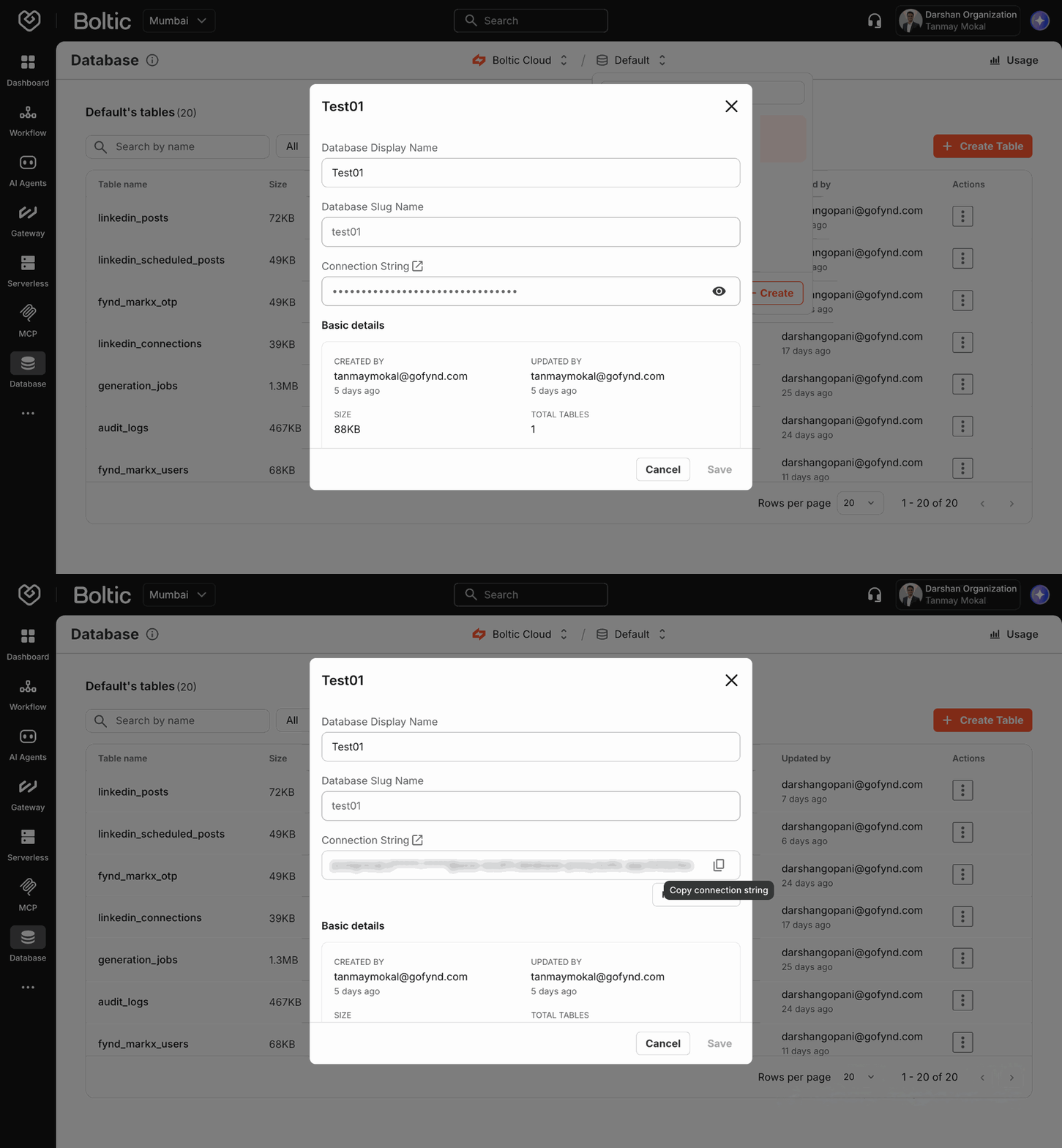
Introducing Direct Boltic Database Access - connect to your Boltic-managed databases using a standard Postgres connection string.
Key Features:
1. Standard Postgres Connectivity
- Connect Boltic Database using a Postgres connection string with any ORM, database client, or BI tool - no custom setup required.
2. Managed Infrastructure with Transparent Access
- All traffic flows through a secure architecture:
- Client → Gatekeeper → PgBouncer → Cloud SQL
- Ensuring performance, safety, and isolation.
3. Quota Enforcement
- Platform-level limits are enforced automatically, including write blocking when usage exceeds defined quotas.
4. Connection Pooling at Scale
PgBouncer manages and optimises database connections for high concurrency and efficiency.
5. Secure Access Control
- Connection strings visible only to database creators
- Access scoped per account and database
- Credentials can be reset anytime
- All tables and schema changes are tracked centrally to ensure consistency and governance.
6. User Access & Roles
Access to Boltic Databases is governed through predefined roles:
- Admin - Full database privileges (schema and data operations)
- Executive - Read/write access to tables and records
- Viewer - Read-only access to tables and records
This ensures controlled collaboration with clear separation of responsibilities.
How It Works:
- Create a database from the Boltic dashboard
- Copy the Boltic database connection string
- Connect using your preferred tool (PSQL, ORM, BI tool, etc.)
Direct Boltic Database Access brings the power of Postgres into Boltic, so you can work with your data directly while still getting the platform’s control, security, and reliability. This means you can build and ship custom extensions/usecases for Fynd Commerce, Shopify, Wix, Magento, and more without worrying about setting up or maintaining infrastructure.
Multi-DB, Encrypted Columns and Indexing - Now Live!
Enhancement
Boltic Database (Boltic Tables) has been upgraded to deliver better scalability, security, performance, and developer experience. This release introduces new capabilities across database management, data protection, and query optimization to help you build and scale more efficiently.
What’s New
1. Multiple Databases per Account
- Create multiple databases within a single account
- Manage databases directly from the Boltic Console
- Easily separate environments (dev / staging / prod)
- Better isolation for different applications
- Scale cleanly as your data footprint grows
2. Encrypted Column Type - Built-In Data Security
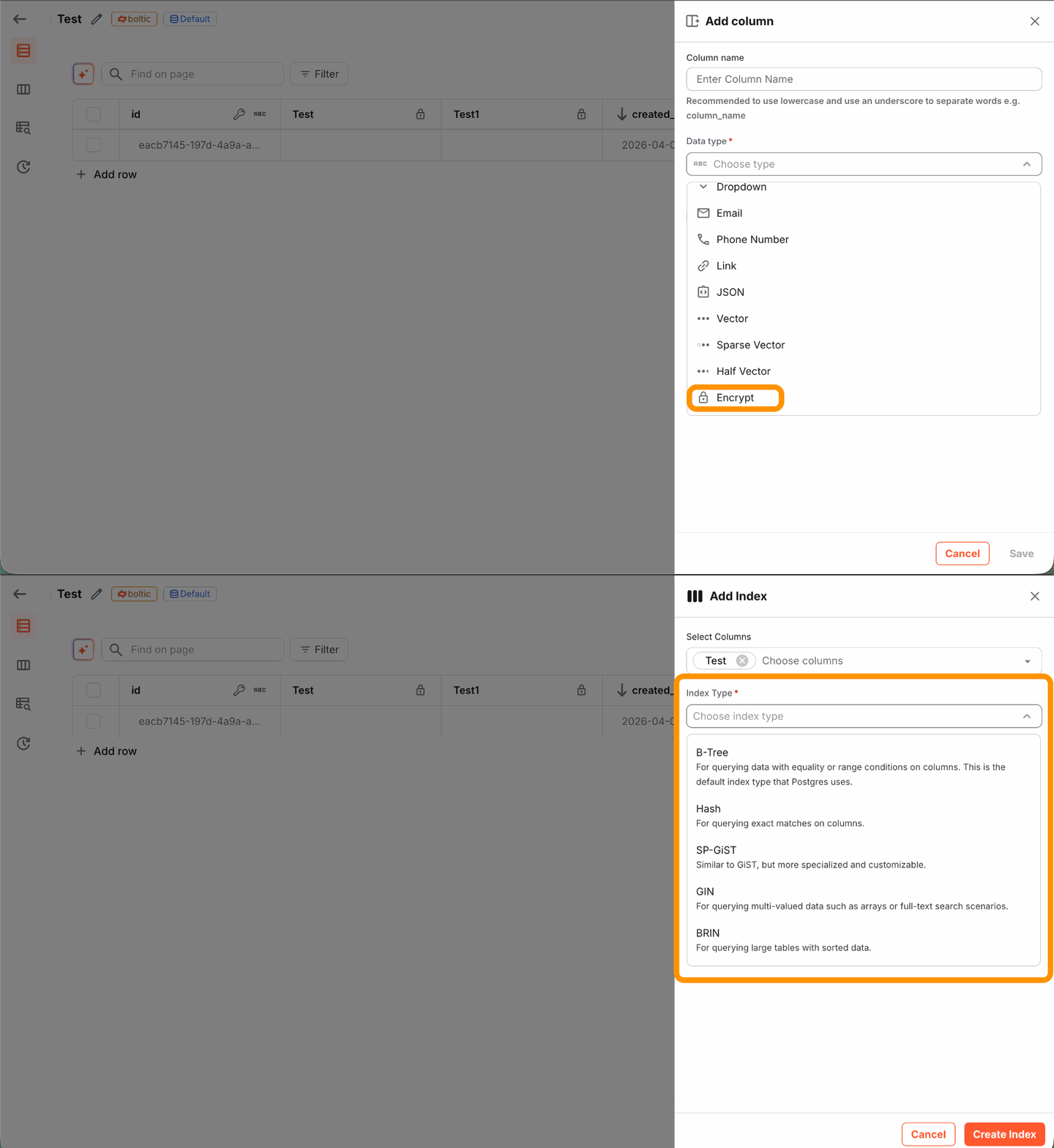
We’ve introduced a new encrypted column type to securely store sensitive data directly in your tables.
Key highlights:
- Encryption is handled automatically by Boltic
- Ideal for PII and confidential information
- Optional deterministic encryption support same input produces the same encrypted output when enabled
3. Index Creation - Boost Query Performance
You can now create indexes on table columns directly in Boltic Tables.
This allows you to:
- Significantly improve query performance
- Clearly view and manage existing indexes per table
- Create and manage indexes directly from the table UI
- Support for single-column and multi-column indexes
- Choose the right index type based on your query pattern:
- B-Tree: equality and range queries
- Hash: exact match lookups
- GIN: arrays and search use cases
- SP-GiST: specialized and hierarchical data
- BRIN: large, naturally ordered tables
4. Revamped Tables UI
- Cleaner and more scannable list view
- Rich detail popup with contextual insights
- Side-panel record viewer for seamless navigation
- Inspect data without losing context
5. Table Templates
- Pre-built schemas for common use cases
- Comes with predefined columns and relationships
- Reduces setup time significantly
- Helps users get started faster

6. AI-Powered Table Filters
- Generate filters using plain English queries
- No need to remember column names or syntax
- AI suggests accurate query logic automatically
- Users can rate responses to improve accuracy
7. Usage Metering & Subscription-Based Blocking
We’ve added usage metering and enforcement based on your account’s subscription plan.
This includes:
- Accurate usage tracking at the account level
- Enforcement based on your subscription plan
- Automatic blocking when limits are exceeded
Why this matters:
- Scale across multiple databases
- Secure sensitive data with encryption
- Optimize performance using indexes
- Stay in control of usage and costs
SQL Workspace for Boltic Database & Storage SDK for Boltic Storage
New Feature
We’re excited to introduce major updates across Boltic, enhancing Boltic Database with a powerful SQL workspace and extending Boltic Storage with a developer-friendly SDK.
What’s New
Boltic Database - SQL Workspace
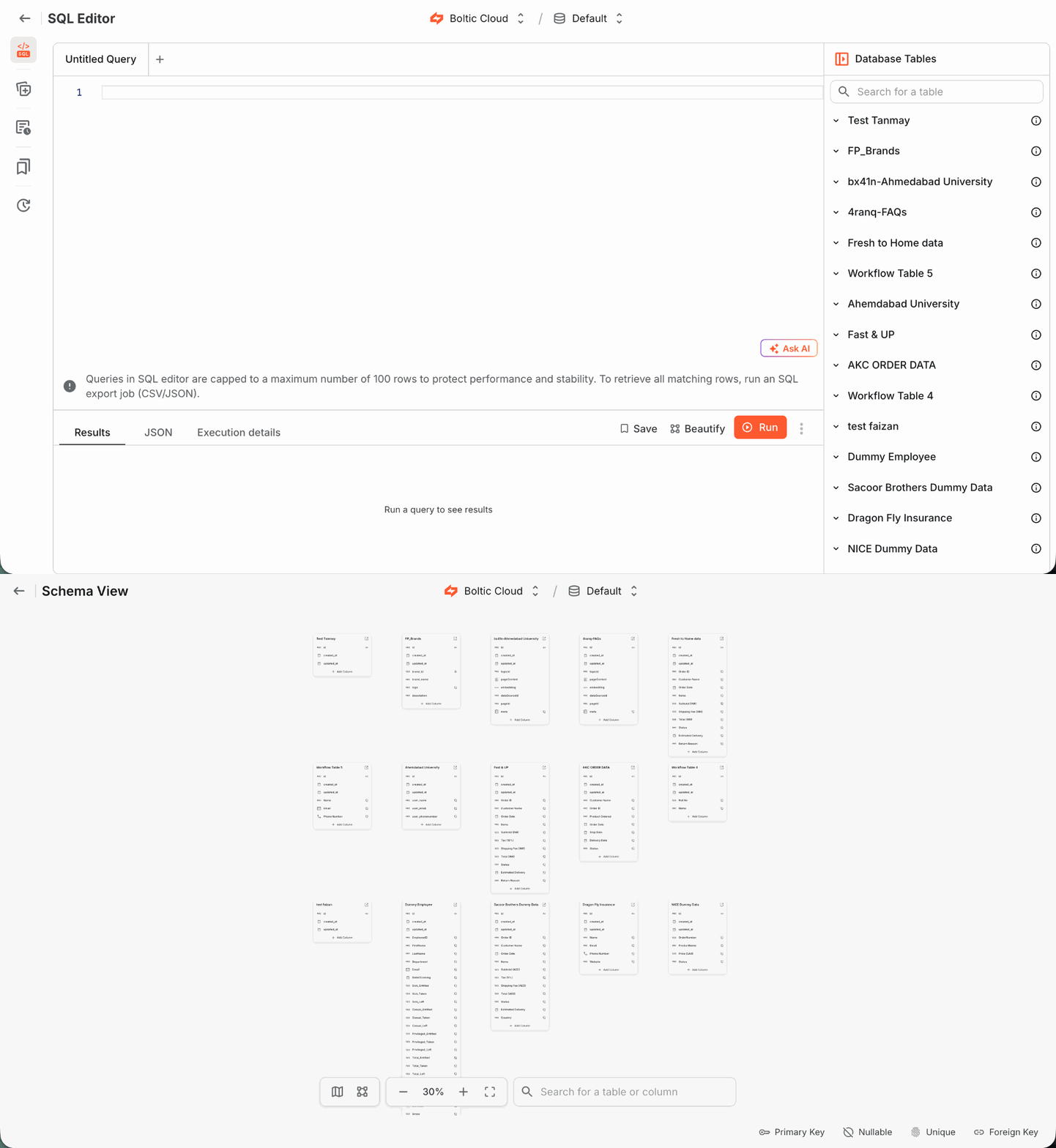
A complete SQL workspace with AI-powered queries, schema visualization, and built-in exports.
1. SQL Editor with AI - Write & Run Queries Effortlessly
- Full-featured SQL editor with multi-tab support
- Run queries with instant results
- Format queries using Beautify
- AI assistance to generate and fix queries
- Smart error messages with actionable suggestions
- View results in Table/JSON formats
- Export query results as CSV or JSON
2. Smart Queries - AI-Powered Query Suggestions
- Smart AI analyzes your database and generates relevant queries automatically
- Need more ideas? AI adapts to your tables and lets you generate additional queries in one click
3. Saved Queries - Reuse & Collaborate
- Save frequently used queries
- Quickly access and re-run saved queries
- Share queries across your team
4. Execution History - Full Query Audit Trail
- Track every query executed with complete visibility
5. Schema Visualizer - Understand Your Database Instantly
- Visual representation of your database schema
- View tables and their columns in a structured layout
- Quickly understand structure
Boltic Storage - Storage SDK
We’re introducing a new SDK for Boltic Storage, enabling developers to seamlessly store, manage, and access files programmatically.
- Upload files to storage bucket
- Create and organize folders with ease
- Manage files efficiently at scale
- Control file visibility:
- Public access
- Private access
- Retrieve files programmatically
We have also published Boltic Storage SDK
NPM: https://www.npmjs.com/package/@boltic/sdk
Doc: https://docs.boltic.io/sdk/storage/overview
Why This Matters
- Run advanced SQL directly inside Boltic Database
- Reduce dependency on external database tools
- Improve team collaboration with shared queries
- Gain full visibility into query activity and exports
- Visualize your schema alongside querying
Combine AI + SQL + Visualization in one unified experience
Boltic Workflows – Failure Handling (Continue on Failure)
Enhancement
We’re excited to introduce failure handling controls in Boltic Workflows, designed to help you build more resilient and reliable automations.
This update gives you finer control over how your workflows behave when something goes wrong.
What’s New: Continue on Failure
You can now configure workflows to handle node failures gracefully instead of stopping execution entirely.
- New setting: Continue on failure (available in Advanced Options)
- Default: OFF
- When enabled, workflows can continue execution even if a node fails
- Unlocks alternative execution paths for better fault tolerance

How It Works
1. When Enabled
- A failure handle appears on the node
- You can connect a separate path to this failure handle
- If the node fails, execution continues via this new failure path
- Define fallback logic, recovery steps, or alternate flows
2. When Disabled
- Any node failure will stop the entire workflow execution
3. Failure Context
The failure path receives context from the failed node, including:
- error → accessible using
activity_name.error
This allows you to:
- Log failures
- Trigger alerts
- Build conditional recovery logic based on failure details
Why This Matters
- Build fault-tolerant workflows that don’t break on minor issues
- Add fallback paths and alternate flows
- Improve production reliability
- Gain greater control over error handling and execution flow
No-Code API Creation with HTTP Request & Response Nodes
New Feature
Fynd Boltic now lets you build real-time, fully functional APIs using visual workflows — no backend coding required. With the powerful combination of HTTP Request and Response nodes, anyone can create custom APIs and webhook-based automations directly within Fynd Boltic.
HTTP Request Node – Start Your Workflow via HTTP
- Triggers workflow execution on receiving an HTTP request.
- Supports multiple HTTP methods: GET, POST, PUT, DELETE, etc.
- Captures path parameters, query strings, headers, and request body.
- Enables synchronous execution — waits for the workflow to complete before sending a response.
- Perfect for API endpoints, webhook handlers, and third-party integrations.
Response Node – Send a Custom Response
- Allows customizing the HTTP response sent after the workflow completes
- Supports setting status codes like 200 OK, 400 Bad Request, 500 Server Error
- Enables adding custom headers such as Content-Type, Authorization, and others
- Supports returning responses in multiple formats including JSON, HTML, Text, XML, YAML, CSV, PDF, Image, Binary, and more
- Provides full control over how the API communicates with the caller
This feature empowers both developers and non-technical users to build, test, and deploy logic-driven APIs visually - making it easier than ever to automate workflows, power integrations, or expose custom services in a secure and structured way.

Execution History Revamp
Enhancement
We’ve given the Execution History page a fresh look and powerful new features to improve visibility, traceability, and debugging:
- Execution Insights Panel - Instantly get a summary of your executions - view total runs, success/failure breakdowns, pending/running states, and average execution time all in one glance.
- Search & Filter Capabilities - Filter by Execution ID, status, date range, or trigger type to find exactly what you’re looking for - faster and easier.
- Detailed Execution Log - Track individual executions with enhanced granularity. Each row now includes status badges, execution timestamps, unique execution IDs, trigger sources, and exact time taken.
- Visual Feedback for Statuses - Quickly identify successful and failed executions using color-coded tags and intuitive icons.
- Real-time Refresh - Use the refresh button to instantly fetch the latest execution data without needing to reload the entire page.

Database Activities – Now Faster & More Powerful
Enhancement
We’ve upgraded database activities to deliver faster performance and broader compatibility with multiple databases - making your workflows smoother and more powerful than ever.
- Lightning-Fast Execution – Query execution time has improved from ~40 seconds to under 3 seconds, dramatically speeding up database interactions.
- Expanded Database Support – Now supports MongoDB, MySQL, PostgreSQL, MSSQL, BigQuery, and ClickHouse, giving users more flexibility with their data sources.
- Full CRUD Functionality – Perform INSERT, SELECT, UPDATE, and DELETE operations directly within your workflows.
- Beta Limitation on SELECT Queries – Currently supports up to 1,000 rows per query during beta phase.
- Seamless Integration – No need for external tools - manage and automate your data processes right within the platform.
- Explore all supported database apps – Database Apps
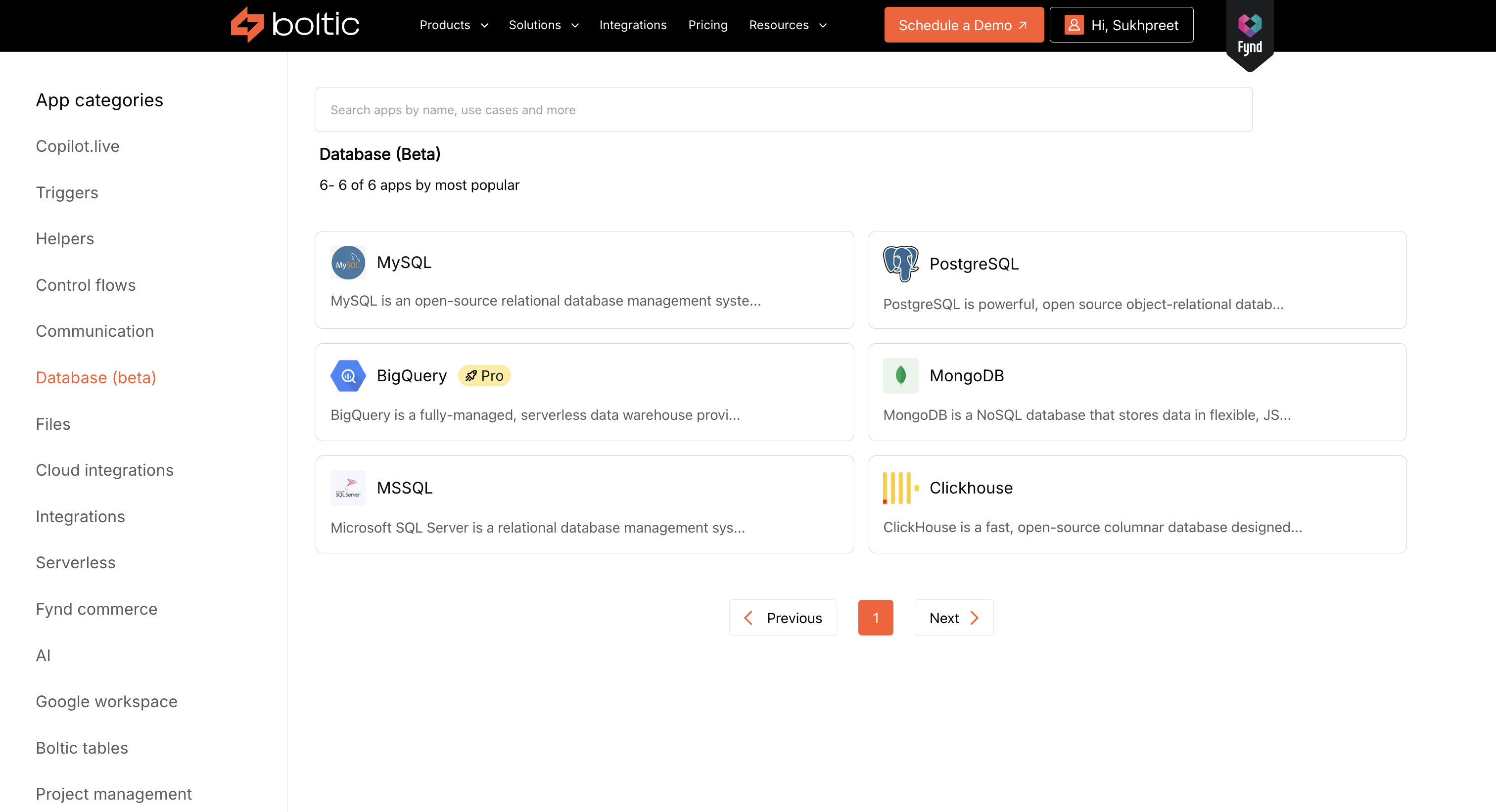
Faster database actions with full CRUD support and multi-database compatibility."
Test & Save button in Activity Nodes
Enhancement
You can now test your activity node configuration before saving it. This helps you instantly catch errors and ensures data flows correctly through your workflow.
- View real-time output before saving the node.
- Easily catch and fix misconfigurations early.
- Improves accuracy and confidence while building.
- You can also skip testing if you prefer

Dynamic Suggestions Panel & Data Pills
Enhancement
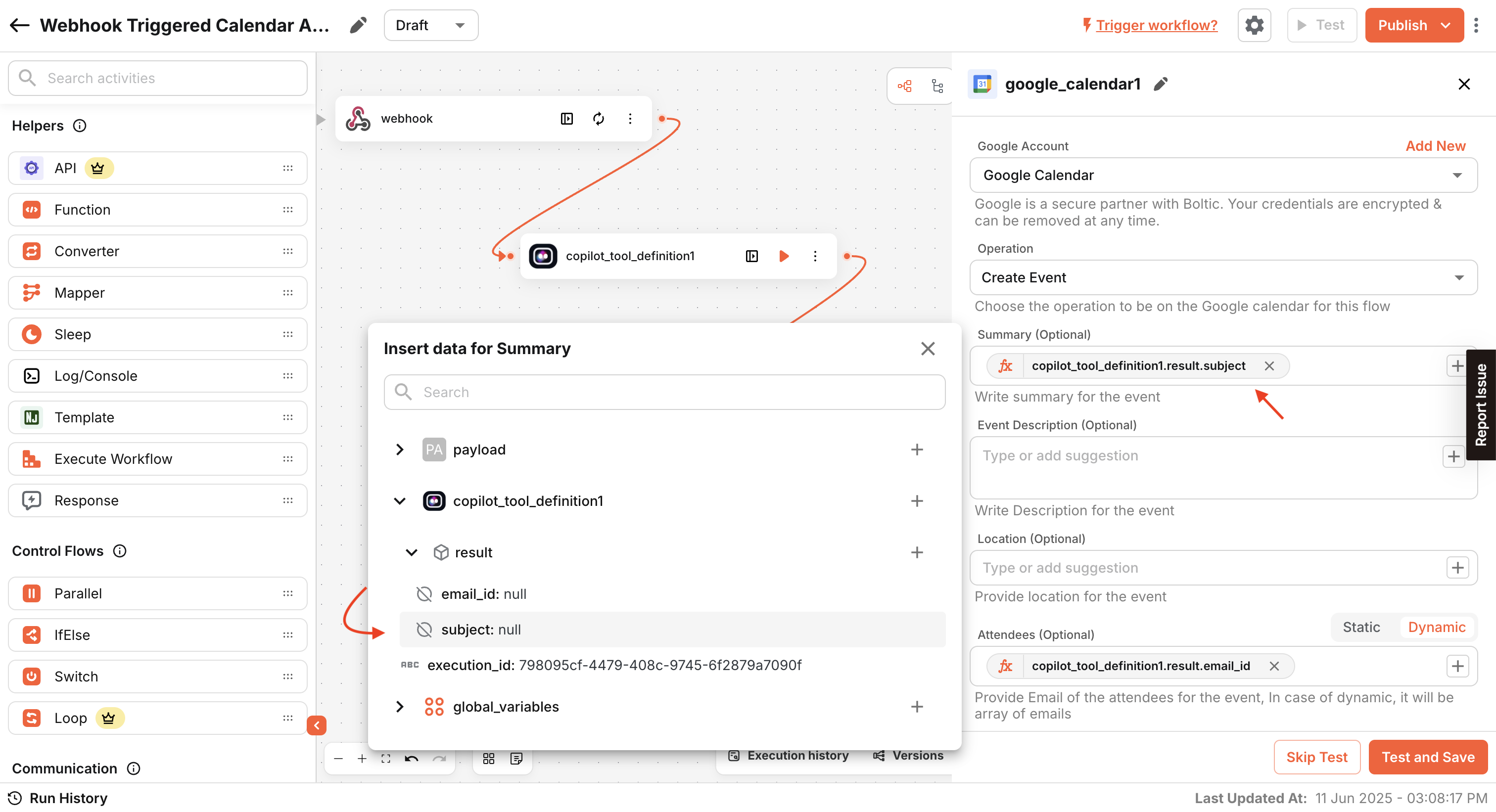
Typing {{ }} manually is now a thing of the past. A dynamic suggestions panel shows available data from previous nodes, making workflows faster and easier to build.
- Auto-suggests available data fields from earlier steps.
- Click to insert values - no need to remember field names.
- Instantly test and run nodes directly from the panel.
- Helps build and debug without navigating away from the form.
JSON-GUI Interface
New Feature
You can now create structured JSON using a simple, no-code visual builder. It’s designed to make your work faster and easier.
- Build JSON visually - no coding needed.
- Supports up to 5 levels of nested objects.
- Great for non-developers and beginners.
- Easily switch between the GUI and raw JSON editor anytime.
.gif)